
How to Use the New AI Assistant, Sage, on Epilepsy.com
Epilepsy News From: Thursday, August 14, 2025
When you visit epilepsy.com, our new AI assistant, Sage, is available to help you find the information about epilepsy you’re looking for instantly, at any time. Using Sage simplifies searching through our full history of expert content and resources, to meet you where you are.
Created in partnership with Amazon Web Services (AWS), Sage was designed to understand the lived experience of the epilepsy community. Thanks to our community partners, like Brave Bears, Sage continues to expand its reach and deepen its impact across our community. Start a chat to get real-time answers, helpful resources, and personalized support whenever you need it.
How to Start a Chat
- On the bottom righthand corner of your screen, click “Chat With Us” to start a chat.

- Where you see “Ask your question here,” type your question or the information you want to find. Hit enter on your keyboard or click the arrow to the right.

- Three dots appear as Sage searches epilepsy.com to find and summarize the best answer from thousands of pages of expert content.
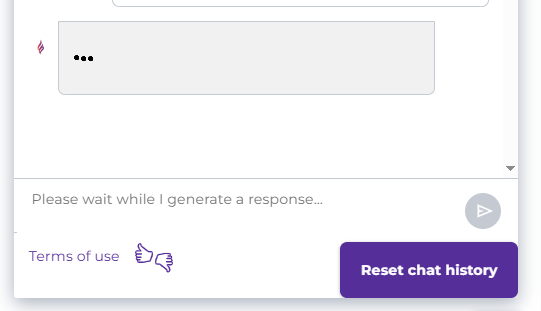
- Continue the chat with as many questions as you have, for as long as you’d like. Sage uses your question history to respond uniquely and empathetically to you each time you ask a question.
- If you want to start a new conversation, click “Reset chat history.” You can come back to the chat at any time.
What Questions Can I Ask Sage?
Sage can answer any questions about epilepsy, seizures, or epilepsy-related topics – for yourself, your child, or a loved one.
|
Image

|
Image

|
Sage Is for Everyone
Wherever you are on your journey with epilepsy, Sage is here to help, 24/7. Sage is ready to help if you’re a caregiver to a person with epilepsy, or if you’re just looking to learn more about epilepsy.
|
Image

|
Image

|
Image

|
FAQ
What happens if I ask a question and do not get a response?
Sage will respond to any question quickly. If you are waiting for Sage to answer (no more than two minutes), there is likely a connection issue. Clicking “Reset Chat History” should fix it.
Why is Amazon involved? Is any of my data shared?
Our partnership is with Amazon Web Services (AWS), which we use solely to host the Sage platform. However, all data remains within an Epilepsy Foundation-owned and governed environment. No data is shared with Amazon.
More Features of Sage:
Expert Information
Epilepsy.com is the leading source for epilepsy information, with decades of content curation, medical expertise, and community insight.
Empathetic and Compassionate
Sage shows care in its responses, reflecting an understanding of the challenges of living with epilepsy and different needs for each member of the community.
Personalized to You
When you use Sage on the same device, the AI assistant remembers your previous chat so you don’t have to start over. As you ask more questions, Sage has more context to provide personalized information.
24/7 Support
Sage is here to help whenever and wherever you need it, providing 24/7 support.
Language-Supported
Sage can respond in multiple languages supported by Amazon Web Services, including English, Spanish, French, Portuguese, and German.
Epilepsy Helpline
The Epilepsy & Seizures Helpline will still be available from 8 a.m. to 8 p.m. ET for further support from Epilepsy Foundation staff.
Sage reflects the Epilepsy Foundation’s commitment to meeting people where they are on their epilepsy journey and ensuring no one faces epilepsy alone.
Authored by
Ashley Grese